Epson Error Code 000043: Causes, Fixes & Step-by-Step Troubleshooting Guide
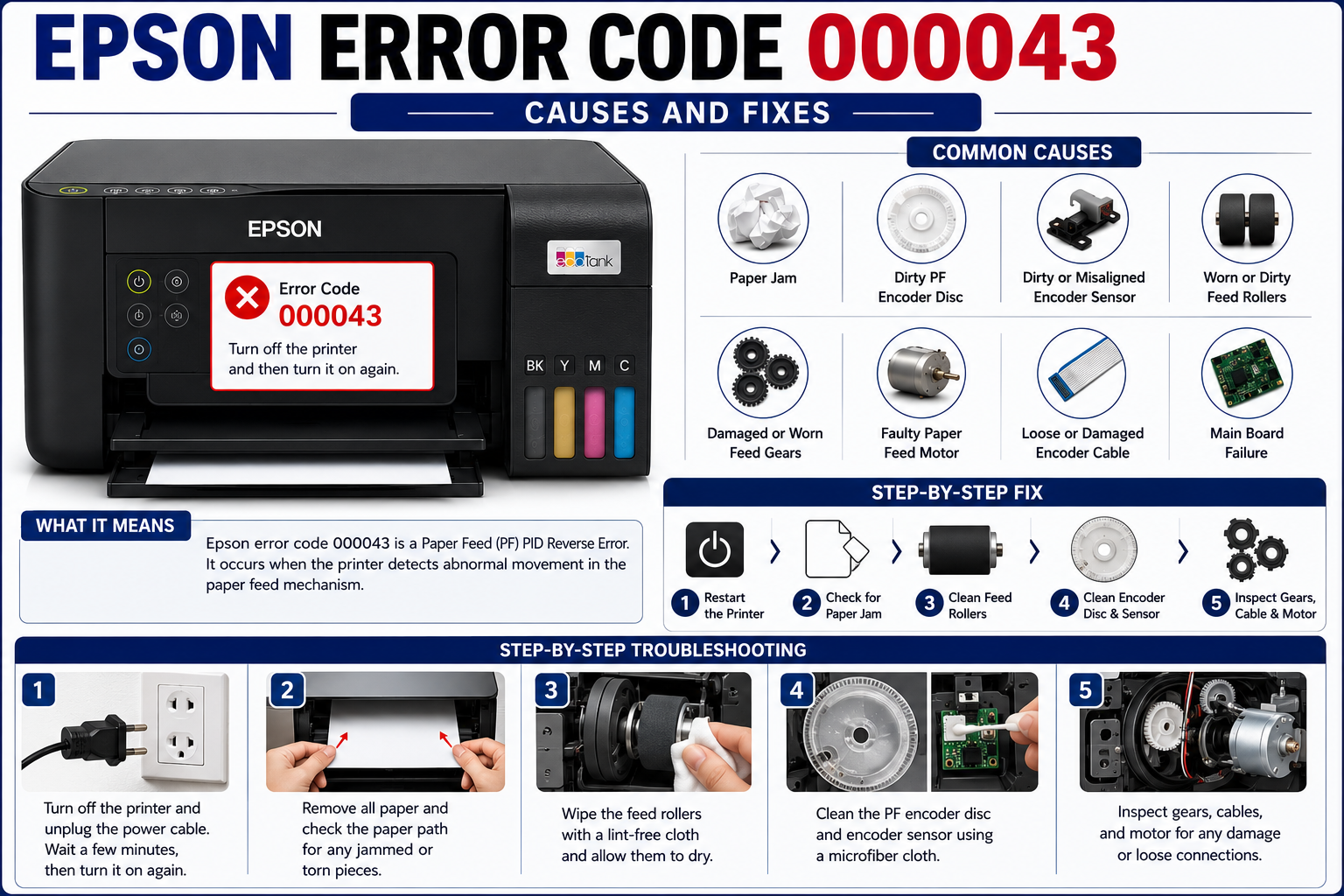
If your Epson printer suddenly stops working and displays Epson error code 000043, don’t panic. While this error often looks serious, it is commonly linked to a problem in the printer’s paper feed (PF) system rather than a complete hardware failure.
In many cases, the issue is caused by a hidden paper jam, a dirty encoder sensor, worn gears, or a malfunctioning paper feed motor. Fortunately, many of these problems can be diagnosed and fixed without replacing the printer.
In this comprehensive guide, you’ll learn exactly what Epson error code 000043 means, what causes it, and the safest ways to troubleshoot it before contacting a repair technician.
What You’ll Learn
By the end of this guide, you’ll know:
- What Epson error code 000043 means
- Why the PF PID Reverse Error occurs
- The most common causes behind the error
- How to troubleshoot the issue step by step
- When cleaning solves the problem
- When replacement parts are required
- When to seek professional repair
What Is Epson Error Code 000043?
Epson error code 000043 is a Paper Feed (PF) PID Reverse Error that occurs when the printer detects abnormal movement in the paper feed mechanism. The issue is usually caused by a paper jam, dirty PF encoder, damaged gears, faulty paper feed motor, or a malfunctioning encoder sensor. Epson service documentation associates this code with reverse or abnormal PF motor feedback rather than a simple paper jam.
Unlike a normal paper jam notification, Error 000043 indicates that the printer’s internal control system detects incorrect paper feed movement or receives unexpected feedback from the PF encoder.
To protect the mechanism from further damage, the printer immediately stops operation. Epson service documentation associates this code with reverse or abnormal PF motor feedback rather than a simple paper jam.
Understanding the PF PID Reverse Error
The term PF PID Reverse Error may sound technical, but it simply describes a mismatch between the paper feed motor’s expected movement and the movement detected by the printer.
Think of it like a car’s GPS.
If your GPS expects you to drive forward but detects you’re moving backward, it immediately flags an error.
Your Epson printer works similarly.
The printer constantly monitors:
- Paper feed motor rotation
- Encoder feedback
- Feed roller movement
- Gear synchronization
If these components become misaligned or stop moving correctly, the printer generates Error Code 000043 to prevent further damage.
Common Causes of Epson Error Code 000043
Although the error message is the same across many Epson printer models, the underlying cause can vary.
The table below summarizes the most common causes and their impact.
| Cause | Severity | DIY Fix Possible? |
|---|---|---|
| Hidden paper jam | Low | ✅ Yes |
| Dirty PF encoder disc | Medium | ✅ Yes |
| Dust on encoder sensor | Medium | ✅ Yes |
| Worn paper feed rollers | Medium | Sometimes |
| Broken paper feed gears | High | No |
| Faulty PF motor | High | No |
| Loose encoder cable | Medium | Yes (if accessible) |
| Main board failure | Very High | No |
Service manuals and repair references consistently identify paper-feed obstruction, contaminated PF encoder scales, damaged encoder cables, PF motor faults, and main board failures as the primary causes of Error 000043.
1. Hidden Paper Jam
The most common cause is a small piece of paper trapped inside the printer.
Many users remove visible paper but overlook tiny torn pieces lodged deep within the paper path.
Common locations include:
- Behind the feed rollers
- Near the duplex unit
- Under the carriage assembly
- Around the rear access door
Even a small paper fragment can prevent the paper feed mechanism from rotating normally and trigger Error 000043.
In the next part, we’ll cover a detailed step-by-step troubleshooting workflow, advanced diagnostics for the PF encoder and motor, model-specific tips, and preventive maintenance to help you resolve the error efficiently.
2. Dirty or Contaminated PF Encoder Disc
The PF (Paper Feed) encoder disc is a transparent plastic disc with fine markings that allows the printer to monitor the paper feed motor’s rotation accurately. If dust, ink mist, grease, or fingerprints cover the disc, the encoder sensor cannot read the markings correctly.
When this happens, the printer assumes the paper feed mechanism is not moving as expected and triggers Epson error code 000043.
Common Symptoms
- Error appears immediately after powering on.
- Printer starts feeding paper, then stops.
- Grinding or clicking noises during startup.
- No visible paper jam.
How to Inspect the Encoder Disc
- Turn off the printer and unplug the power cable.
- Open the printer cover carefully.
- Locate the paper feed motor area (model-specific location).
- Identify the transparent encoder disc attached to the motor shaft.
- Check for:
- Dust buildup
- Ink splashes
- Fingerprints
- Scratches
- Cracks
Cleaning Tips
- Use a lint-free microfiber cloth.
- Lightly dampen the cloth with isopropyl alcohol (90% or higher).
- Gently wipe both sides of the encoder disc.
- Allow it to dry completely before reassembling the printer.
Expert Tip: Never use paper towels or abrasive cloths. Even tiny scratches on the encoder disc can affect the sensor’s accuracy.
3. Dirty or Misaligned Encoder Sensor
The encoder sensor works with the encoder disc to track the paper feed motor’s movement. If the sensor becomes dusty or shifts out of position, it may misread the encoder markings.
Signs of a Faulty Encoder Sensor
- Random paper feed errors
- Printer works intermittently
- Error appears after transportation
- Cleaning the encoder disc doesn’t resolve the issue
What to Check
- Dust inside the sensor slot
- Loose sensor mounting screws
- Damaged wiring
- Bent sensor bracket
Cleaning the sensor with compressed air or a soft brush often resolves minor issues.
4. Paper Feed Roller Problems
Feed rollers grip and move the paper through the printer. Over time, these rubber rollers wear out, become smooth, or collect dust.
When the rollers lose traction, the paper may slip or fail to feed correctly, leading the printer to detect abnormal paper feed movement.
Symptoms of Worn Rollers
- Multiple sheets feeding at once
- Paper slips without moving
- Skewed paper alignment
- Frequent paper feed errors
How to Clean Feed Rollers
- Turn off the printer.
- Remove all paper from the tray.
- Rotate each roller manually.
- Clean with a lint-free cloth lightly dampened with water.
- Allow the rollers to dry before testing.
If the rubber is cracked or excessively smooth, replacement is recommended.
5. Damaged Paper Feed Gears
The paper feed mechanism relies on a series of plastic gears to transfer motion from the motor to the rollers.
If even one gear is cracked, worn, or missing teeth, synchronization is lost, resulting in Error Code 000043.
Warning Signs
- Loud clicking noises
- Grinding sounds
- Feed rollers stop rotating
- Printer jams repeatedly
- Error occurs immediately during startup
Can You Repair It Yourself?
Replacing paper feed gears usually requires:
- Complete printer disassembly
- Gear alignment
- Timing calibration
- Specialized tools
For most users, professional repair is the safer option.
6. Faulty Paper Feed (PF) Motor
The PF motor powers the paper feed mechanism. If it becomes weak, overheats, or fails electrically, the printer can no longer control paper movement accurately.
Common PF Motor Symptoms
- Motor hums but doesn’t rotate
- No paper movement
- Burning smell
- Repeated startup failures
- Persistent Error 000043 after cleaning
DIY Check
Without opening the motor:
- Listen for unusual noises.
- Observe whether the rollers attempt to rotate.
- Check if the motor starts and stops abruptly.
A failed motor generally requires replacement.
7. Loose or Damaged Encoder Cable
The encoder sensor communicates with the printer’s main board through a delicate ribbon cable.
A loose or damaged cable can interrupt communication, causing incorrect encoder readings.
Inspect the Cable For
- Loose connectors
- Torn ribbon
- Pinched wiring
- Corrosion
- Burn marks
Reconnect loose cables carefully. If the ribbon is damaged, replace it with a compatible part.
8. Main Board Failure
Although less common, a faulty main board can also generate Error 000043.
The main board processes signals from:
- PF motor
- Encoder sensor
- Carriage motor
- Various printer sensors
If the board cannot interpret these signals correctly, it may incorrectly report a PF error.
Possible Indicators
- Multiple unrelated error codes
- Printer won’t initialize
- No motor activity
- Burn marks on the board
- Previous power surge or liquid damage
Main board replacement should only be performed by trained technicians.
Step-by-Step Troubleshooting Guide for Epson Error Code 000043
Follow these steps in order to identify and resolve the issue.
Step 1: Restart the Printer
- Turn off the printer.
- Disconnect the power cable.
- Wait 5 minutes.
- Reconnect and power on.
If the error clears, it may have been a temporary firmware or initialization issue.
Step 2: Check for Hidden Paper
Inspect:
- Input tray
- Rear paper path
- Duplex unit
- Under the carriage
- Feed rollers
Remove any paper fragments carefully.
Step 3: Clean the Feed Rollers
Dust and paper residue can reduce roller grip.
Clean all accessible rollers and allow them to dry completely.
Step 4: Inspect the Encoder Disc
Check for:
- Dust
- Ink
- Fingerprints
- Cracks
Clean gently using isopropyl alcohol and a microfiber cloth.
Step 5: Clean the Encoder Sensor
Remove accumulated dust using:
- Compressed air
- Soft anti-static brush
Avoid touching the sensor with your fingers.
Step 6: Listen for Mechanical Noises
Power on the printer and note any:
- Clicking
- Grinding
- Buzzing
- Repeated motor attempts
These sounds often indicate gear or motor problems.
Step 7: Inspect Internal Gears
If you’re comfortable opening the printer:
- Check for broken gear teeth.
- Ensure gears rotate freely.
- Look for foreign objects blocking movement.
Step 8: Seek Professional Repair
If the error persists after completing all previous steps, the issue is likely related to:
- PF motor failure
- Encoder sensor failure
- Main board malfunction
- Internal gear damage
Professional diagnosis is recommended.
Common Mistakes to Avoid
Many users accidentally make the problem worse while trying to fix the printer.
Avoid these mistakes:
- Pulling jammed paper forcefully
- Using sharp tools inside the printer
- Touching the encoder disc with bare fingers
- Spraying cleaning liquids directly onto components
- Ignoring grinding noises
- Continuing to print despite repeated errors
- Using incompatible replacement parts
How to Prevent Epson Error Code 000043
Preventive maintenance can significantly reduce the likelihood of encountering paper feed errors.
Best Practices
- Clean the printer monthly.
- Store paper in a dry environment.
- Use genuine or high-quality paper.
- Avoid overloading the paper tray.
- Remove dust regularly.
- Keep the printer covered when not in use.
- Replace worn rollers before they fail.
- Perform firmware updates when recommended.
Routine maintenance helps extend the life of the paper feed mechanism and minimizes unexpected downtime.
When Should You Contact a Technician?
Professional service is recommended if:
- Error returns immediately after cleaning.
- Grinding noises continue.
- The PF motor does not rotate.
- Internal gears are damaged.
- The main board shows signs of failure.
- The printer has experienced water or power damage.
Attempting advanced repairs without the proper tools or experience can lead to additional damage.
Expert Recommendations
Based on common service scenarios, start with the simplest and least invasive checks before replacing components:
- Restart the printer.
- Inspect for hidden paper fragments.
- Clean the feed rollers.
- Clean the PF encoder disc.
- Clean the encoder sensor.
- Check ribbon cable connections.
- Inspect gears for visible damage.
- Test the PF motor.
- Consider professional diagnosis for main board issues.
Following this sequence can save time and avoid unnecessary replacement of expensive parts.
Frequently Asked Questions (FAQs)
1. What does Epson error code 000043 mean?
Epson error code 000043 indicates a Paper Feed (PF) PID Reverse Error. It means the printer has detected abnormal movement in the paper feed mechanism, often caused by a paper jam, dirty PF encoder, faulty paper feed motor, damaged gears, or a malfunctioning encoder sensor.
2. Can I fix Epson error code 000043 myself?
Yes. Many users can resolve the issue by checking for hidden paper jams, cleaning the paper feed rollers, cleaning the PF encoder disc, and inspecting the encoder sensor. If the error persists after these steps, professional repair may be necessary.
3. Is Epson error 000043 caused by a paper jam?
Often, yes. A hidden paper fragment inside the paper path is one of the most common causes. However, the error can also result from mechanical or electronic faults in the paper feed system.
4. Does cleaning the encoder disc fix Error 000043?
If dust, ink, or fingerprints are preventing the encoder sensor from reading the disc accurately, cleaning the encoder disc may resolve the error. Use a lint-free microfiber cloth and isopropyl alcohol for safe cleaning.
5. Which Epson printers show error code 000043?
This error can appear on several Epson Eco Tank and WorkForce printers, including models such as:
- Epson L3210
- Epson L3250
- Epson L3150
- Epson L3110
- Epson L5190
- Epson ET Series
- Epson WorkForce Series
The exact repair procedure may vary by model.
6. Will resetting the printer remove error 000043?
A restart may clear temporary initialization issues, but it will not fix a hardware or mechanical fault. If the root cause remains, the error will return after restarting.
7. Can outdated firmware cause Epson error code 000043?
Firmware problems are uncommon for this error. Since 000043 is generally related to the paper feed system, cleaning and hardware inspection should be performed before considering a firmware update.
8. How much does it cost to repair Epson error 000043?
| Repair | Estimated Cost* |
|---|---|
| Cleaning Service | $15–$40 |
| Feed Roller Replacement | $20–$60 |
| PF Motor Replacement | $40–$100 |
| Gear Assembly Replacement | $50–$120 |
| Main Board Replacement | $80–$200 |
*Costs vary depending on your location, printer model, and service provider.
9. Should I continue printing after the error appears?
No. Continuing to operate the printer may worsen mechanical damage, especially if a gear, motor, or paper feed assembly is failing.
10. When should I contact an Epson service center?
Contact a service center if:
- Cleaning does not resolve the issue.
- The PF motor is not rotating.
- Internal gears are damaged.
- Multiple error codes appear.
- You suspect a main board failure.
11. Can a dirty paper feed roller trigger Error 000043?
Yes. Worn or dirty rollers may fail to grip the paper correctly, causing the paper feed mechanism to operate abnormally and triggering the error.
12. Is Epson error code 000043 a software issue?
In most cases, no. It is primarily a mechanical or hardware-related issue involving the paper feed system.